
Doc viewer: every WPS, PQR and welder certificate in one place
Find the document. Not the person who has it.
Production, quality, purchasing and your clients all need welding documents — but they should not have to ask the welding coordinator for every PDF. The weldXpert doc viewer puts every WPS, PQR and welder certificate in a tree of clients, projects and welders, so anyone with access finds the right document in a few clicks.
Everyone needs the documents, one person knows where they are
A foreman wants the WPS for tomorrow’s joint. Quality needs the certificate of the welder who did a repair. A client asks which PQR a procedure is based on. In most companies each of these questions ends up with the same person: the welding coordinator, who knows which folder, which revision and which file name.
Sending PDFs by e-mail creates the next problem: copies. A WPS that was revised last week still circulates in an old attachment, and nobody can tell which version is current.
The doc viewer gives these colleagues their own way in. They look documents up themselves, directly in weldXpert, and the welding coordinator keeps working instead of searching.
Every WPS and PQR under its client and project
In the client view the tree follows the way your work is organised: client, project, then the WPSs of that project. Each WPS shows its status — approved, waiting for approval or draft — and the PQR it is based on, so the link between procedure and qualification is visible before you even open a file.
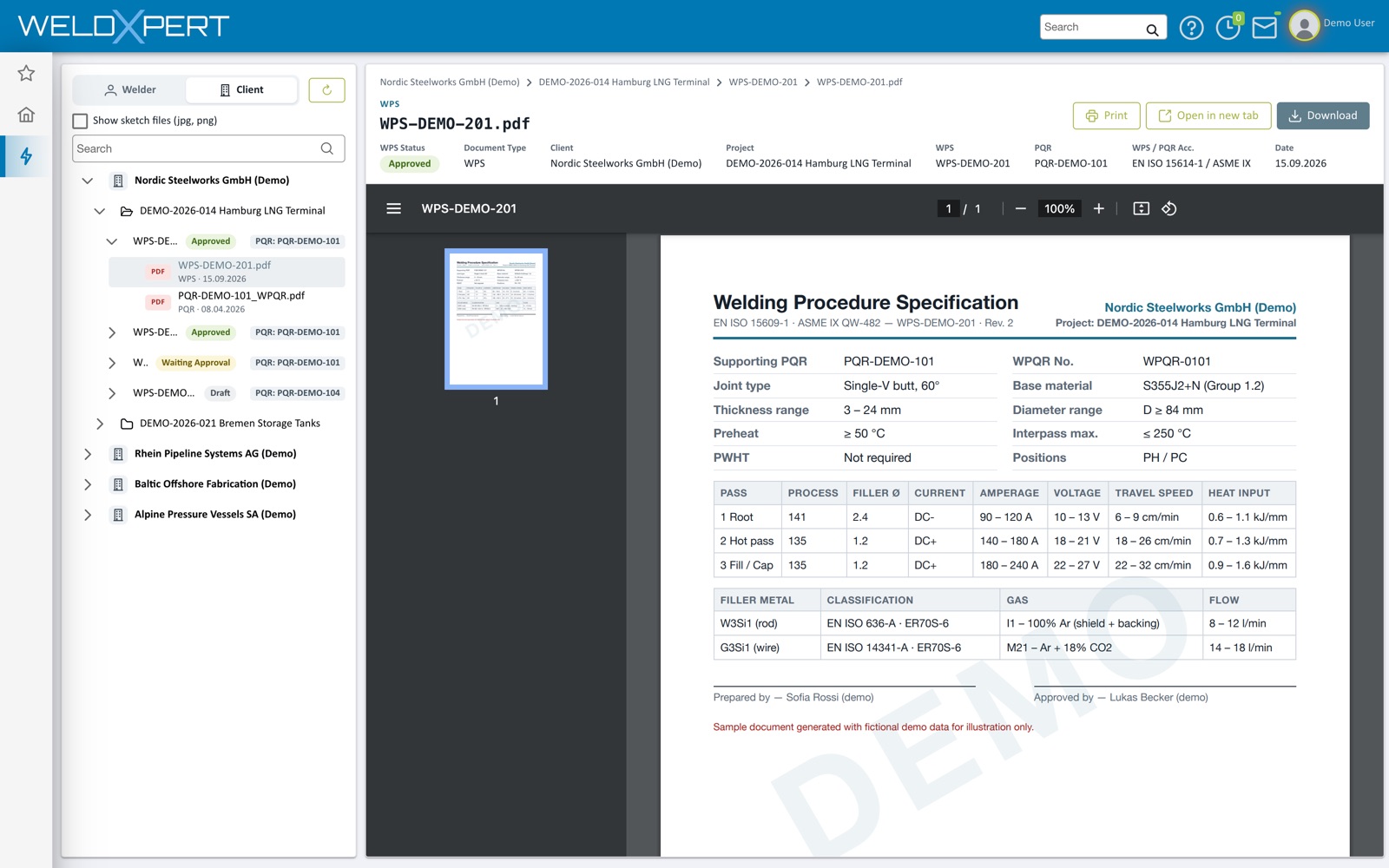
Click a document and it opens next to the tree. Above the document you see its key data — status, client, project, PQR, standard and date — and you can print it, open it in a new tab or download it. Sketch files (jpg, png) can be shown in the tree as well when you need them.
Every welder with their certificates
Switch to the welder view and the tree lists your welders with their ID and number of certificates. A coloured dot shows at a glance whether a welder’s certificates are valid, coming up for renewal or expired, and each certificate shows how many days it has left.
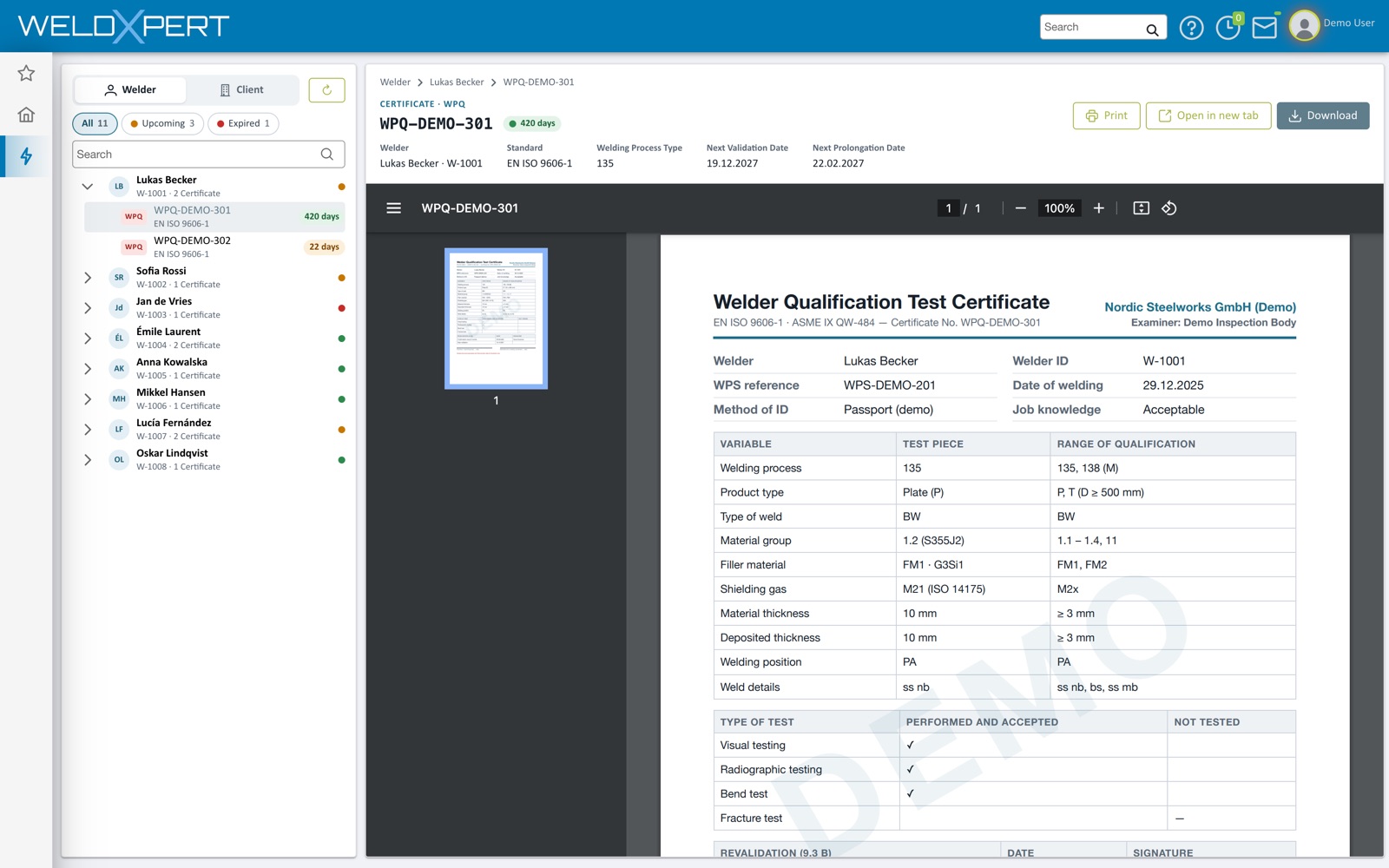
Filters for all, upcoming and expired certificates narrow the list down — useful before an audit or when planning who goes to which job. Open a certificate and its standard, welding process and next validation and prolongation dates appear above the document.
Read-only access for everyone who only needs to look
Colleagues who only need to find documents get read-only access. They can search, view, print and download, but they cannot change a WPS, a PQR or a certificate — that stays with the people who are responsible for them.
- Tree of clients, projects and welders
- Client and project kept separate
- Search WPS, PQR and welders
- Read-only users
- Status and expiry visible in the tree
- Print, open in new tab, download
The documents in the doc viewer are the ones created and kept in the WPS, PQR and welder qualification modules, so the doc viewer and the modules always show the same records.
Where the documents come from
The doc viewer is the reading side of weldXpert. The documents themselves are made in the modules: WPSs filled from qualified PQRs, PQRs stored with their values and welder certificates filled in from the test results.
Questions about the doc viewer.
What is the weldXpert doc viewer?
A tree of clients, projects and welders in which every WPS, PQR and welder certificate is one click away. It is meant for colleagues who need to find, view, print or download documents.
Can doc viewer users change documents?
Not as read-only users. They can search, view, print and download; changes to WPSs, PQRs and certificates are made in the modules by the responsible people.
Which documents are in the doc viewer?
The WPSs and PQRs of every client and project, and the certificates of every welder. Sketch files (jpg, png) can be shown as well.
Can I see which certificates are about to expire?
Yes. In the welder view a coloured dot shows each welder’s status, every certificate shows its remaining days, and you can filter on upcoming and expired certificates.
Where are the documents stored?
All data is stored in an ISO 27001 certified data centre in the EU, and only users of your account can see your documents.
See it with your own documents.
Book a free introduction meeting — we show you weldXpert with examples from your welding department.